Algoritma is an internal accounting platform designed for a company that works with multiple clients, bank
accounts, counterparties, and currencies.
The goal of the product is to bring financial data into one structured interface: bank operations, account
balances, clients, counterparties, profit and loss indicators, and exchange rate difference calculations.
Before this project, the company relied on a combination of 1C and Excel spreadsheets. While these tools were
familiar to the team, the workflow was fragmented. Some data lived in spreadsheets, some in 1C, and some logic
existed only in internal explanations and manual calculations. This made it difficult to see the full picture,
scale the process, and reduce the risk of human error.
My job is to design a practical web interface that could support the company’s real accounting workflow,
reduce manual mistakes, and make complex financial logic easier to review and use.
PERIOD / January 2026 - now
Process
I work on this project as a UI/UX designer in collaboration with the client and the developer. My
responsibilities include:
understanding the company’s accounting workflow;
clarifying business logic with the client;
mapping financial processes into schemes and tables;
designing key user flows and interface layouts;
creating and iterating prototypes;
adapting design ideas to technical constraints;
reviewing implemented screenSs and testing changes for usability, logic, and bugs.
The project is still in progress. The current case study shows early and mid-stage design iterations, while
the product continues to evolve through development, testing, and client feedback.
/ USERS /
The platform is designed for three main user roles.
Business owner. Needs to see the overall financial picture, check balances, review
analytics, and understand exchange rate differences.
Accountant. Needs to verify calculations, check whether payments are entered correctly,
review clients and counterparties, and make sure the financial logic is accurate.
Operator. Needs to enter primary data from bank statements into the system. This user
works with large amounts of repetitive data, so the interface must reduce cognitive load and minimize the
chance of mistakes.
/ THE CHALLENGE /
The company wanted to move away from Excel-based workflows.
Excel was flexible, but difficult to scale. A spreadsheet could be accidentally edited, broken, or
overwritten. When many operations are entered manually, even a small mistake in the wrong cell can affect the
whole calculation.
1C remained useful, but it did not fully cover the team’s needs, especially when it came to internal
analytics and custom exchange rate difference calculations.
The main challenge was to turn a complex, partially manual accounting process into a web interface that would
be:
clear enough for daily use;
structured enough for accounting logic;
safe enough to reduce accidental edits and deletions;
flexible enough to support different user roles;
realistic enough for development.
/ UNDERSTANDING THE DOMAIN /
Before designing the interface, I had to understand how the company’s accounting process worked.
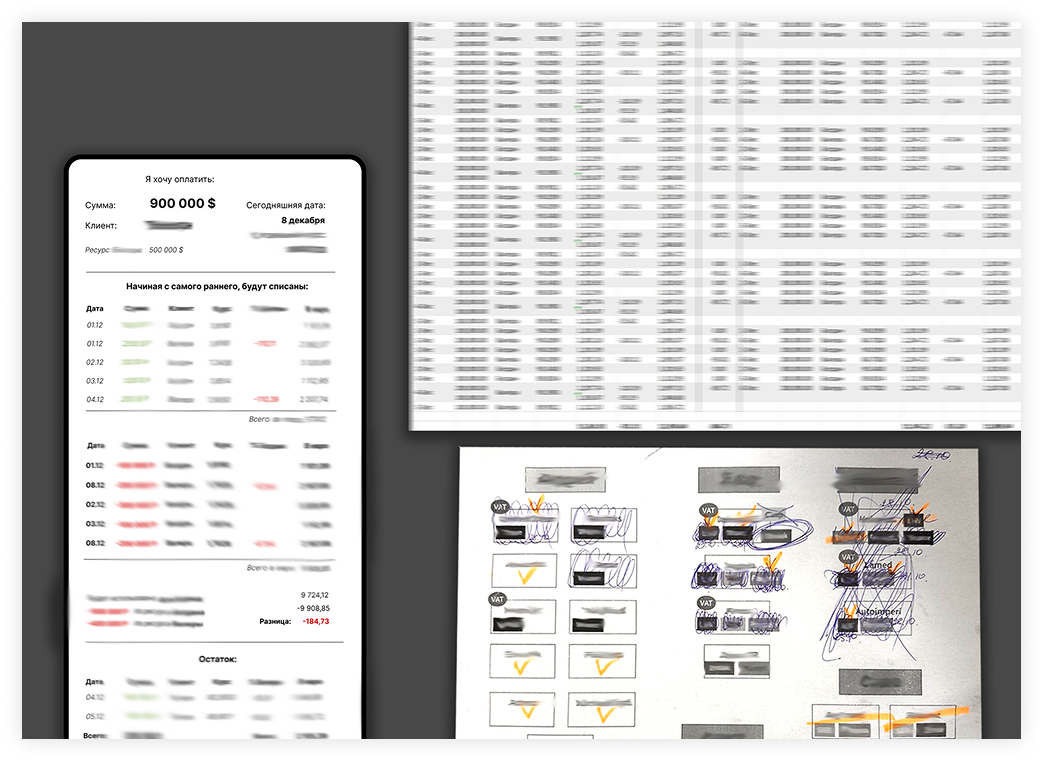
I discussed the logic with the client, studied internal terminology, reviewed test data, and created
simplified tables and schemes. These helped me understand how money, goods, currencies, commissions,
discounts, clients, suppliers, and bank operations were connected.
I also mapped the movement of goods: purchase, sale, FIFO-based write-off, currency conversion, exchange rate
difference, and additional modifiers such as fees and benefits.
Early schemes and tables used to understand the domain
/ KEY PROBLEM 1 - MANUAL DATA ENTRY /
One of the most important workflows is adding bank operations to the system.
The operator usually enters bank statements once a week. On average, this means around 150 rows in one
session, or about 600 records per month. In the previous workflow, this kind of repetitive work created many
opportunities for mistakes.
The risky parts were not only incorrect values, but also accidental changes: deleting the wrong information,
editing the wrong cell, or placing data in the wrong part of a spreadsheet.
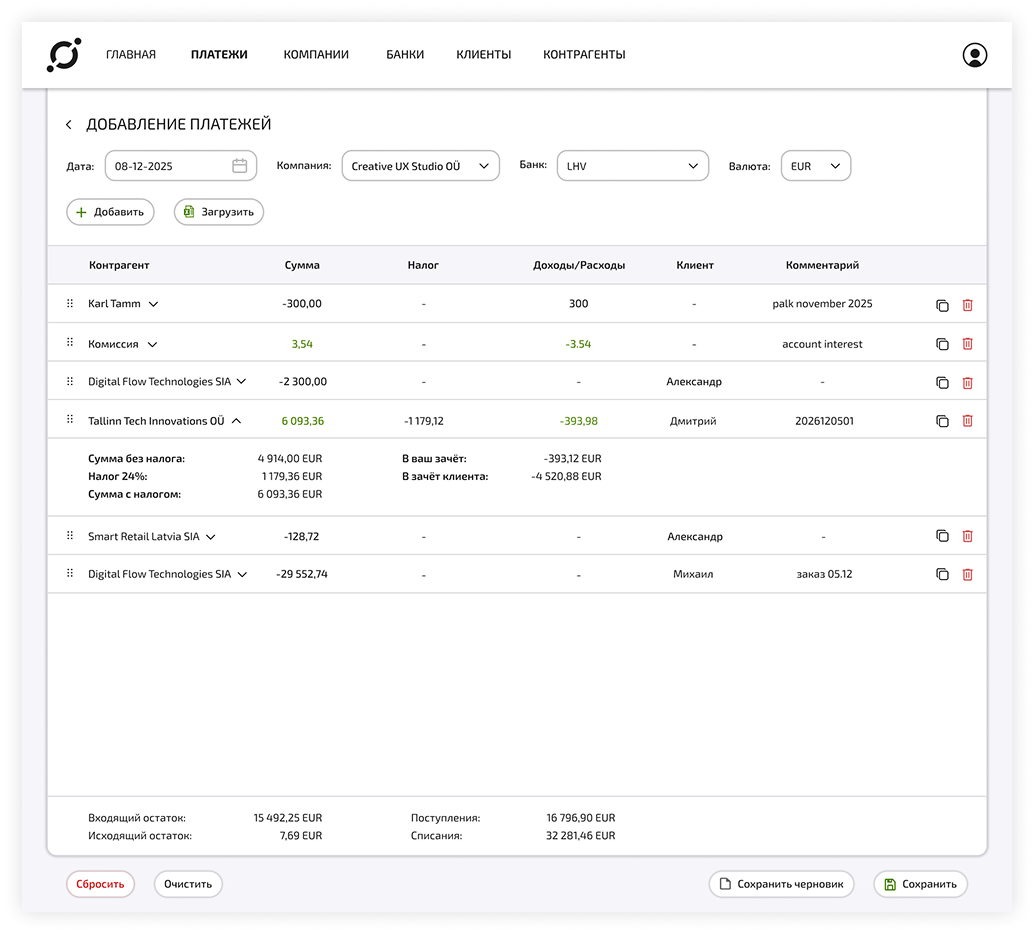
To reduce this risk, the new interface separates data entry from destructive actions. Editing and deleting
are not done directly in a free spreadsheet-like area. Instead, these actions are available through specific
controls.
/ DESIGN DECISION - MANUAL DATA ENTRY /
An early version of the payment entry flow required the operator to fill in all fields for every new
operation. This created too much repetitive work.
The flow was redesigned around reusable context.
Instead of choosing the date, company, bank account, and currency for every single transaction, the operator
sets these parameters once in the form header. After that, they can add multiple payments within the same
context and only change the fields that are different.
This approach was inspired by the logic of 1C, where users often work with predefined parameters and adjust
only what changes. The goal was to make data entry faster, reduce cognitive load, and lower the chance of
manual errors.
/ KEY PROBLEM 2 - EXCHANGE RATE DIFFERENCE /
One of the most complex parts of the project was the exchange rate difference module.
In simple terms, exchange rate difference appears when a company buys or sells something in a foreign
currency, but accounting is calculated in euros. If the exchange rate changes between purchase and sale, the
company may gain or lose money because of that rate difference.
For example, if the company buys goods for 1,000 dollars when 1 dollar equals 0.91 euros, the
purchase equals 910 euros. If the same value is later sold when 1 dollar equals 0.88 euros, the result equals
880 euros. The company receives 30 euros less because the dollar became cheaper against the euro.
The concept itself is not difficult. The complexity appears when there are many currencies, clients,
suppliers, agreements, markups, commissions, and different rules for calculating profit.
The client already had the need for this module, but there was no existing interface or visual model for it.
It existed as an idea inside the company.
/ DESIGN DECISION - EXCHANGE RATE DIFFERENCE /
The first step was to work through the exchange rate logic in Excel using test data. This helped clarify what
information had to be visible, what calculations had to be supported, and what the user needed to understand
quickly.
The most important thing the user should see is whether the exchange rate difference for the selected period
is positive or negative.
The interface also had to support the company’s FIFO logic. FIFO means “first in, first out”: goods purchased
earlier are written off first. This is important for calculating both the exchange rate difference and product
markup.
At first, I explored a more visual representation of FIFO. It was easier to understand at a glance, but
technically more difficult to implement and scale. After discussing it with the developer, we decided to keep
the FIFO logic but present it in a table-based format.
This was a deliberate compromise. The table made the solution easier to implement, easier to scale, and still
clear enough for reviewing the calculation.
/ KEY SCREENS /
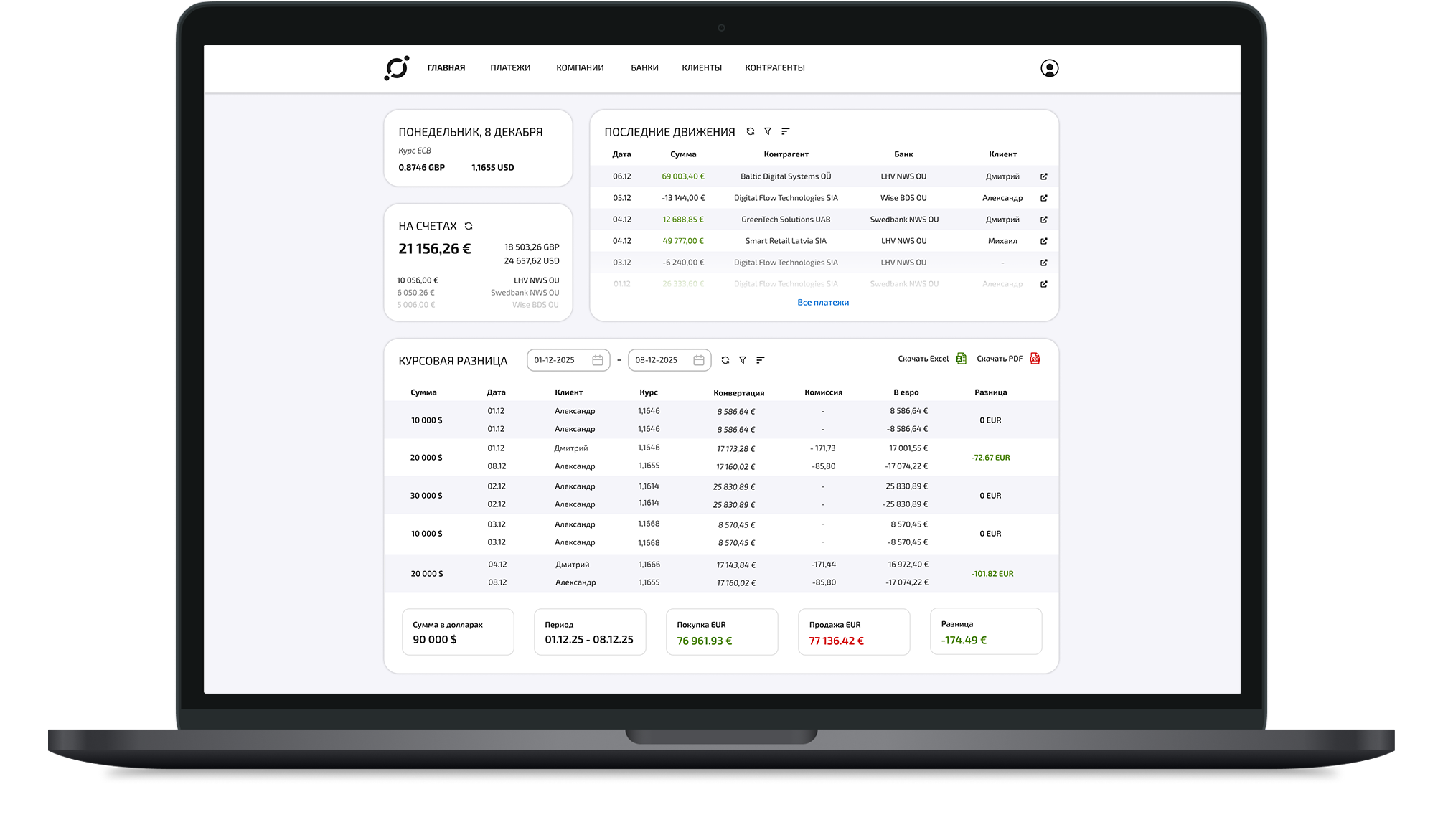
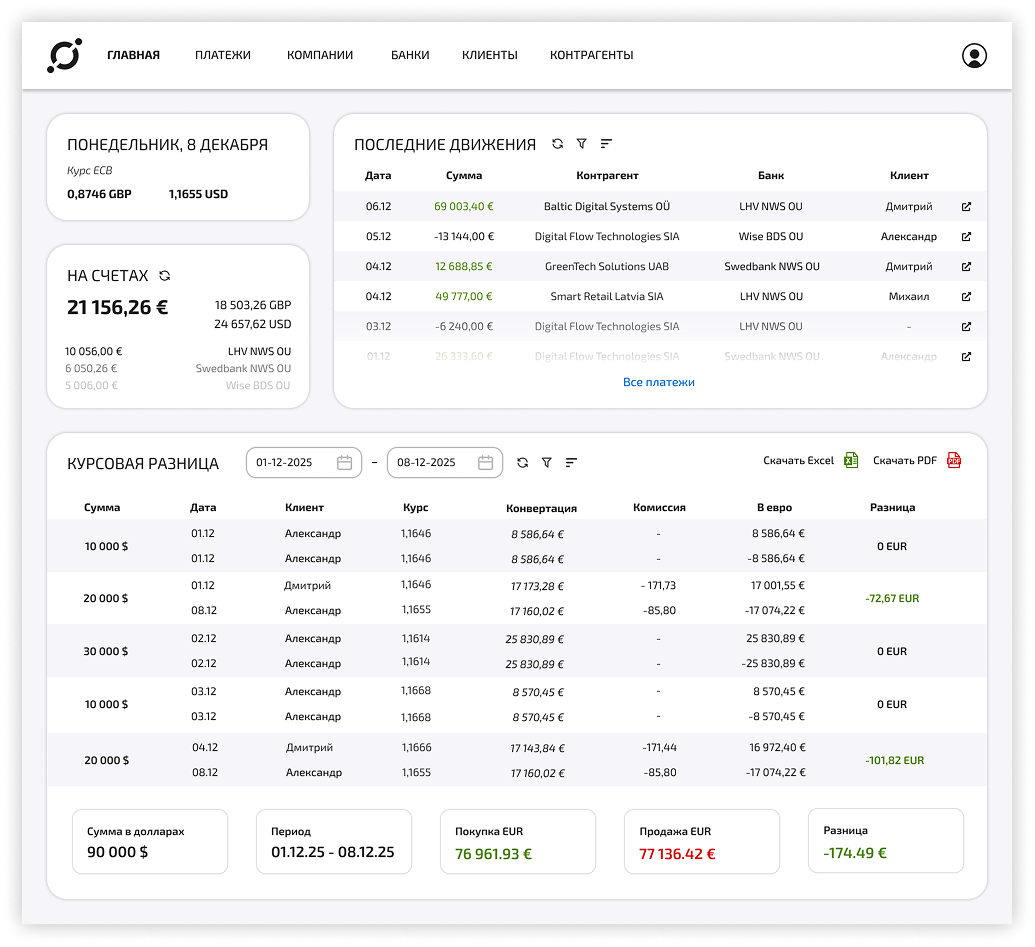
Dashboard. The dashboard gives the business owner a quick overview of the company’s current state.
It includes the current date, exchange rates used in calculations, account balances, recent operations, and
access to key financial blocks. The goal is to help the user understand what is happening in the business
without opening several separate tools.
Exchange Rate Difference. This module helps the business owner and accountant review exchange rate difference
for a selected period.
The goal is not only to show the final number, but also to make the calculation
traceable. Users need to understand where the result comes from and whether the logic behind it is correct.
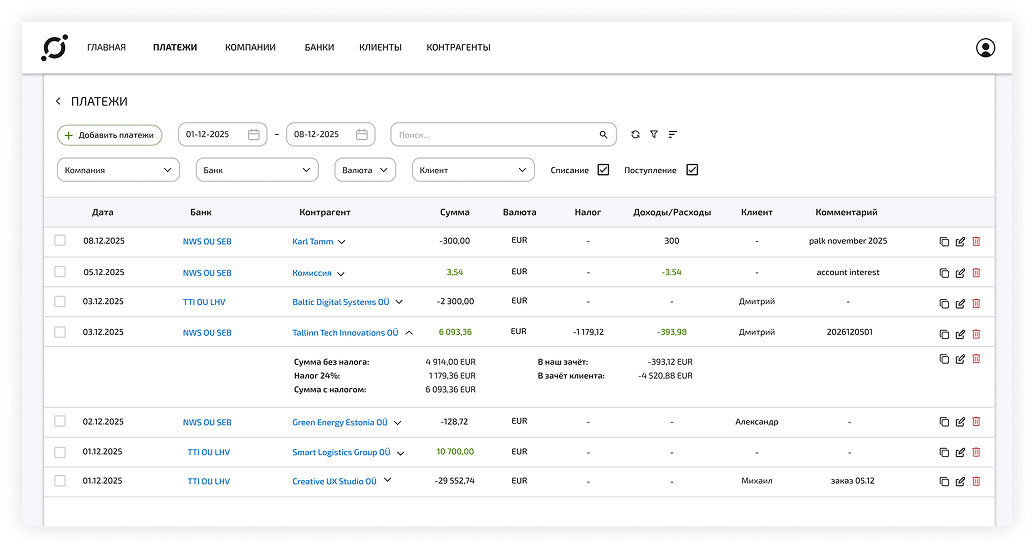
Payments. The payments screen allows users to view, filter, sort, edit, copy, and delete bank operations.
Since the system contains many records, filtering and sorting are important for checking the right data
quickly. The interface supports different ways of working with operations while keeping high-risk actions
controlled through dedicated buttons.
Add Payments. The add payments flow is designed for the operator.
The main goal is to support fast manual
entry of bank statement data while reducing repetitive input. The form uses shared parameters and presets so
the operator does not need to fill in the same fields again and again.
This part of the product is currently being redesigned further. As development continues, the number of
fields has grown, so one of the next goals is to reduce manual input by using presets, templates, and
automatic calculations where possible.
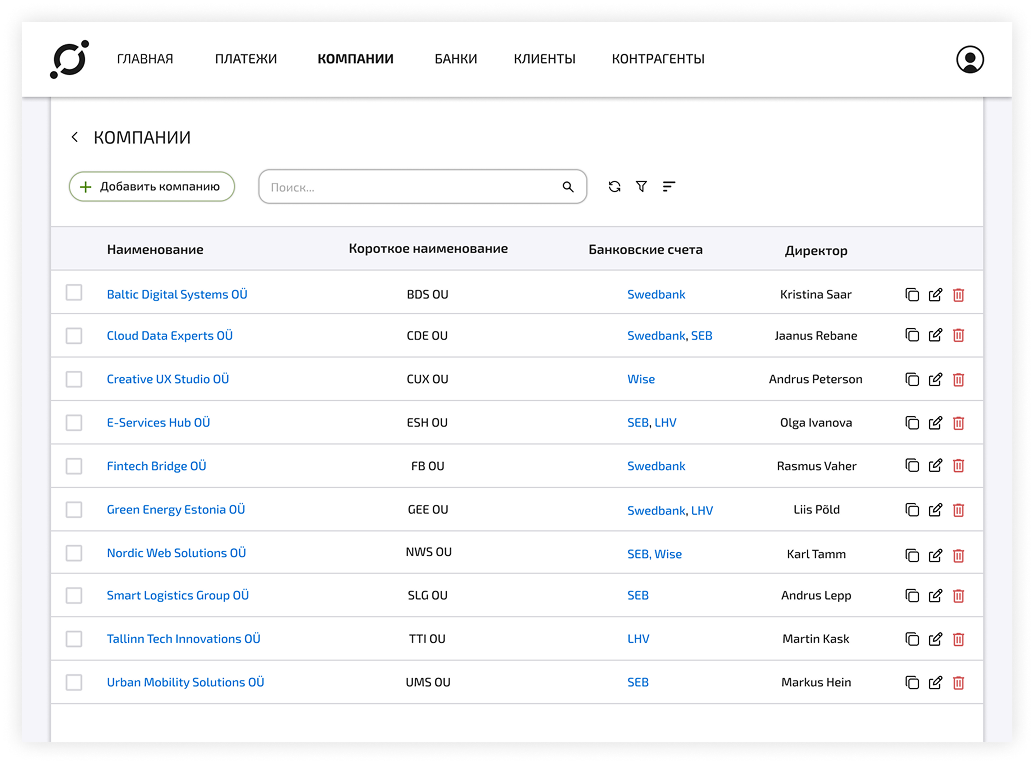
Companies. The companies section allows the accountant to add and manage the legal entities whose financial
activity will be tracked in the system. This screen is important because the platform is designed around
multiple companies, bank accounts, currencies, and operations. Before payments, bank accounts, balances, and
exchange rate calculations can work correctly, the system needs a clear structure of companies that belong to
the accounting workflow.
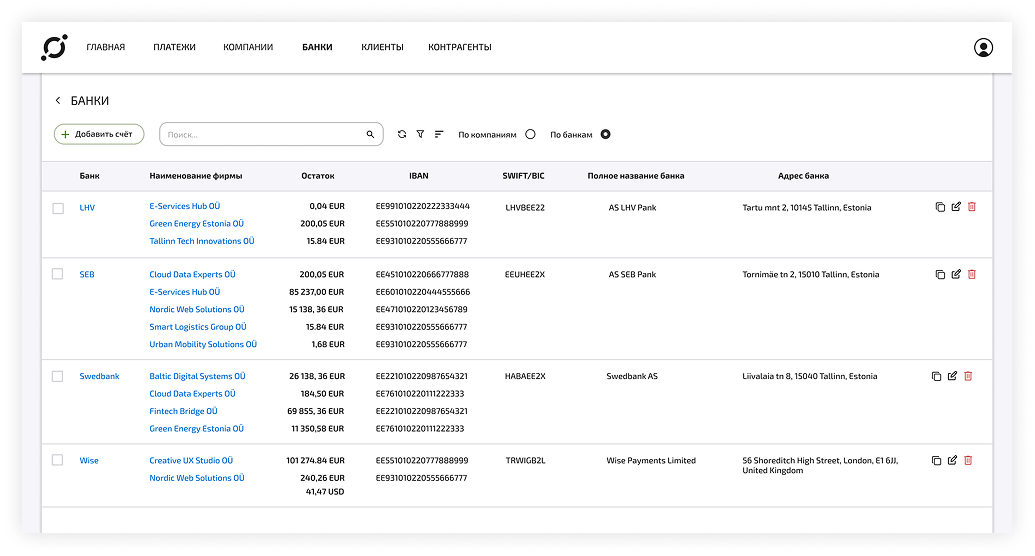
Banks. This section helps users manage banks and accounts connected to different companies. It shows useful
information such as banks, companies that have accounts in those banks, current balances, and account details.
The information can be viewed from different perspectives, for example grouped by bank or by company.
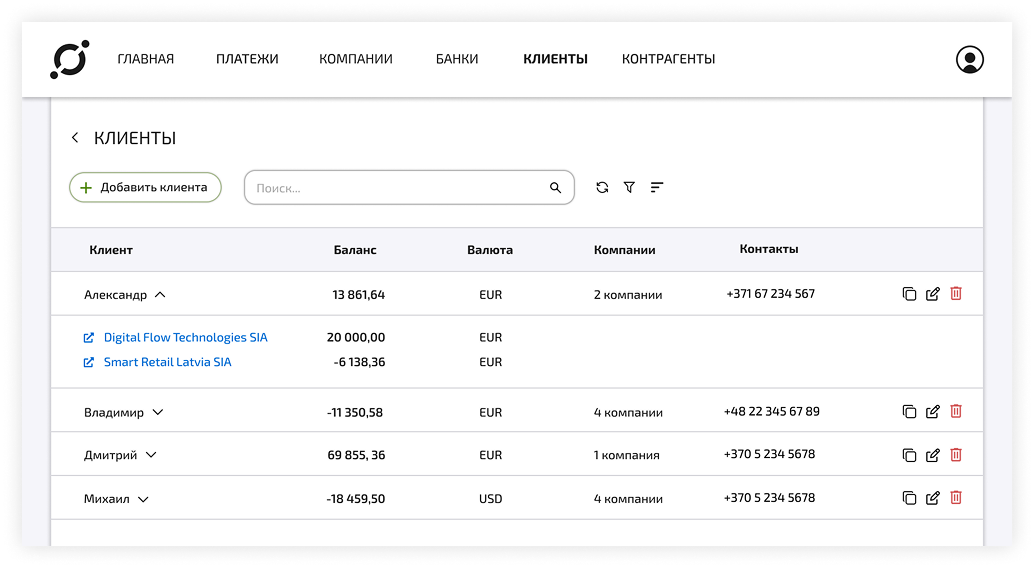
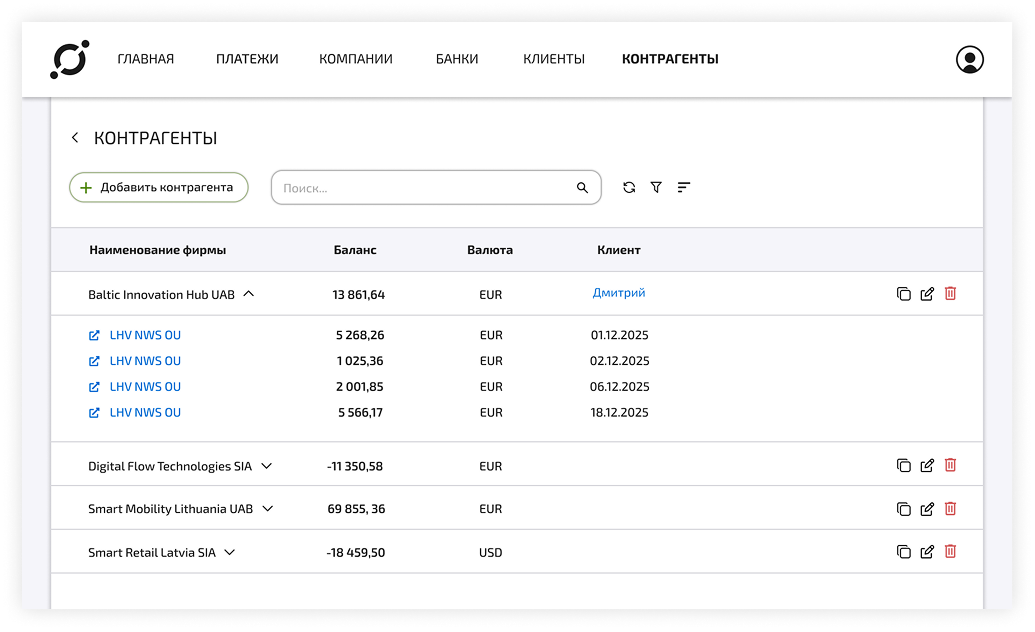
Clients and Counterparties. The clients and counterparties sections help the accountant review relationships
between managers, represented companies, contact information, recent payments, balances, currencies, and
financial obligations. These screens are important because the accountant needs to verify whether the data
entered into the system matches the real financial relationships between the company and its partners.
Early results
The project went through around four major design iterations. Some early ideas were redesigned after testing
the workflow and discussing implementation complexity with the developer.
The interface also gives the team a clearer shared reference point for discussing functionality, testing
assumptions, and improving the system.
/ CURRENT STATUS /
The product is currently in active development. The developer has already implemented the server side, client
side, database, main screens, user roles, admin panel, additional payment fields, and other functionality.
We continue to review new changes together, testing the interface for usability, calculation logic, and bugs.
Before a design goes into implementation, it is checked with the client to make sure the data is displayed
correctly and the solution matches the company’s workflow.
/ NEXT STEPS /
The next stage focuses on improving the payment entry flow, testing it with the operator, validating
calculations with the accountant, refining the exchange rate difference module, and developing a more
consistent visual style.
Another important goal is to reduce manual input by using presets, templates, and automatic calculations
where possible.
/ WHAT THIS PROJECT TAUGHT ME /
This project taught me how important it is to understand the logic behind an interface before designing the
interface itself.
In a complex internal tool, good design is not only about clean screens. It is about asking the right
questions, understanding the user’s responsibilities, reducing the risk of mistakes, and turning business
logic into a system that people can actually work with.
For me, this project became an exercise in careful, responsible design: listening to the client, working with
technical constraints, checking details, and making sure that every interface decision supports the real
workflow behind it.

 WORK IN PROGRESS